
Drag, Drop, & Deploy. It’s that easy (Part 1)
Note: This is Part 1 of a two-part series. Part 2 will drop in a few weeks and will showcase what Rogue Architect can do when paired with an AI building assistant. Big things are coming.
THE PROBLEM: Cyber Range labs take FOREVER to build
Here at Rogue Labs we’ve spent years building cyber range labs. And after creating several realistic scenarios with 27+ domain-joined machines, users, real files, and full Active Directory infrastructure, one thing has become very clear.
Building realistic red or blue team labs is slow, painful, and far more expensive than most people expect.
If you’ve built labs before, you already know where things fall apart:
Ansible playbooks sprawl and break over time.
Networking turns into its own multi-week project.
Infrastructure overhead never ends.
Fresh labs feel fake and unrealistic.
Teams want isolation and collaboration.
And full builds routinely take 10+ hours, only to fail near the end.
well we decided to build something better.
Meet Rogue Architect
Browsing a Rogue Architect Blueprint
Rogue Architect is a new visual lab-building system inside Rogue Arena designed to make cyber range creation fast, repeatable, and realistic.
No long Ansible scripts.
No hypervisor management.
No per-minute cloud billing.
Instead, labs are built using a drag-and-drop blueprint that abstracts away complexity without sacrificing control.

After building out your Blueprint, start your ‘build’ in just a couple of clicks!
How does it work?
Using Rogue Architect, users build massive lab scenarios in 5 Main Steps:
Add Containers + Configure Firewall Rules
Add Machines
Iterate/Modify Blueprint (as needed)
Add Plugins to Machines
Launch Your Build
STEP 1: Add Containers + Configure Firewall Rules

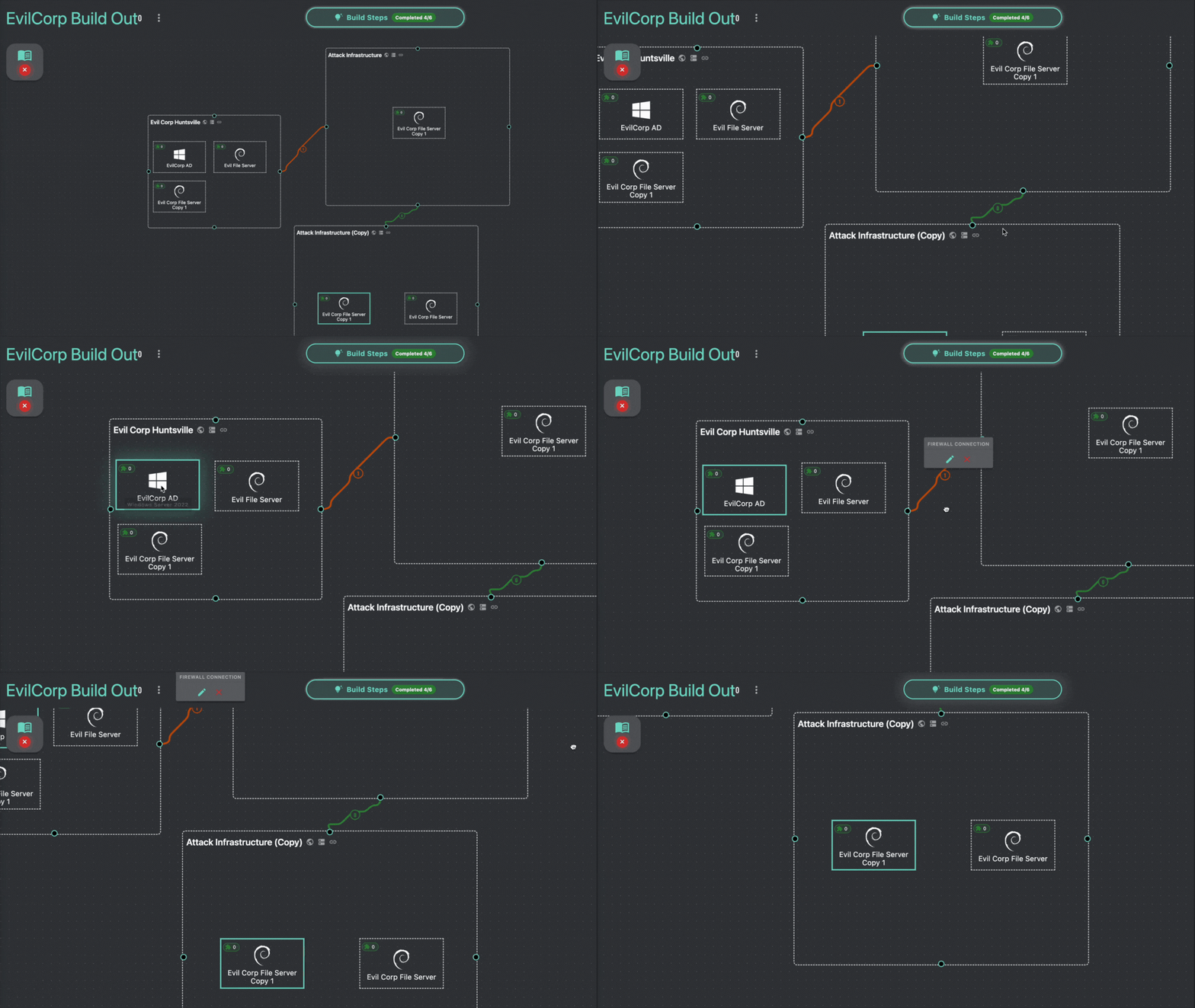
Adding a container (VLAN) to a Blueprint
Each container is a VLAN and logical network segment.
Want to setup an Active Directory Domain? Drop a VLAN.
Need a DMZ? Drop another.
Multi-site scenario? Drop VLANs for each geographic office!
Need to configure more advanced networking? We provide an advanced view allowing users to customize each of the VLANs to their liking…changing IP addressing schemas, forwarding DNS to certain hosts, etc

Connect two VLANs to start the firewall creation process
Users can either set Allow All Traffic on a container, allowing all scenario traffic to flow into the VLAN, or they can connect VLANs (shown above) to start creating powerful firewall rules with our Firewall Rule wizard!

Firewall rules allow users to restrict traffic into VLANs via source/destination IP addresses, or ports
STEP 2: Add machines
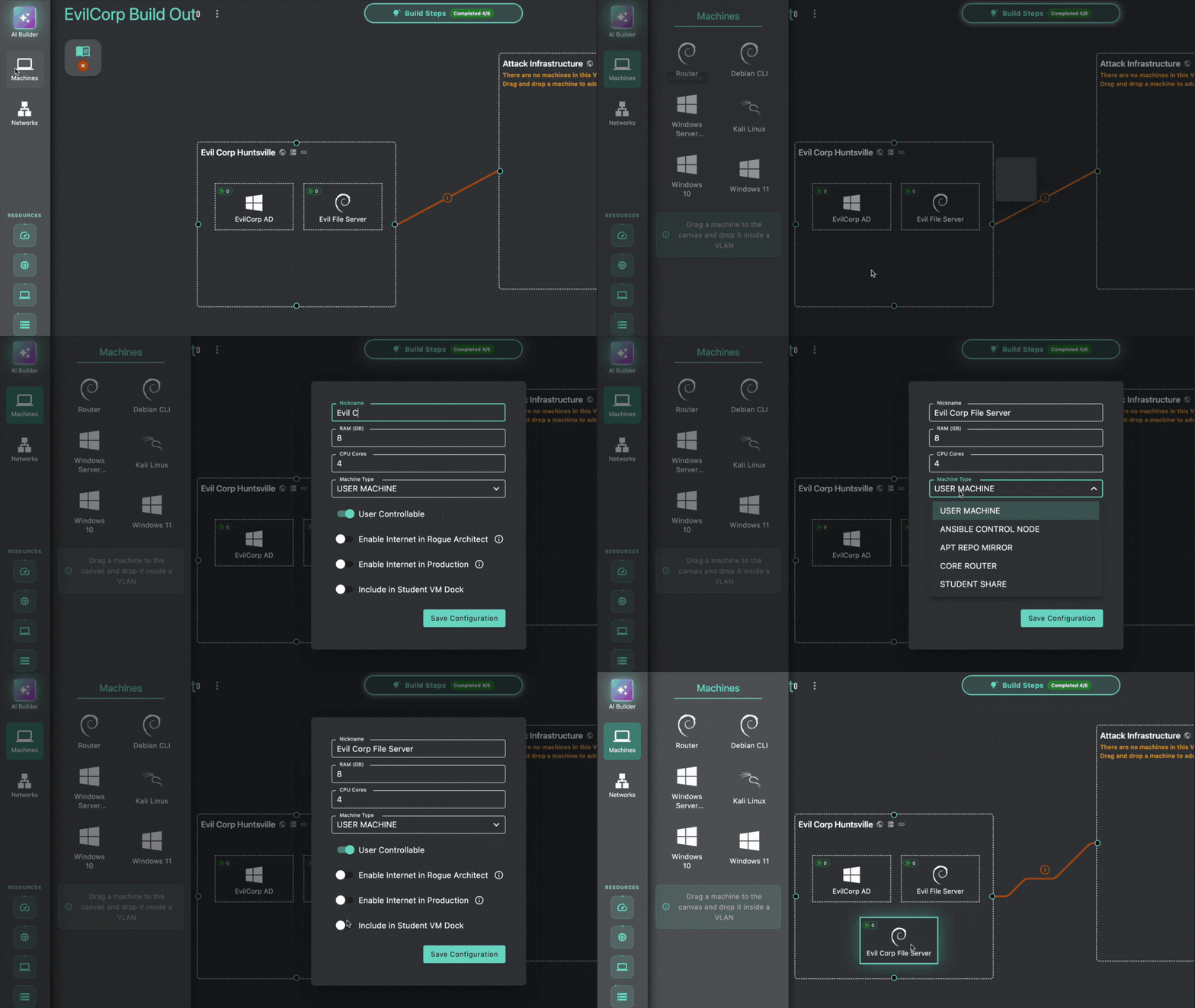
Add machines to your Blueprint to start building your scenario
Users browse our library of operating system templates and add any machine they’d like to see in their scenario. This includes adding Windows 10, Windows 11, Server 2022, or pick from any of our Linux Machine options!
There are infinite possibilities and Rogue Architect gives users full control over system resources (RAM+CPU) while always working behind the scenes to abstract away all complicated networking and machine template customization.
STEP 3: Iterate and modify Blueprint
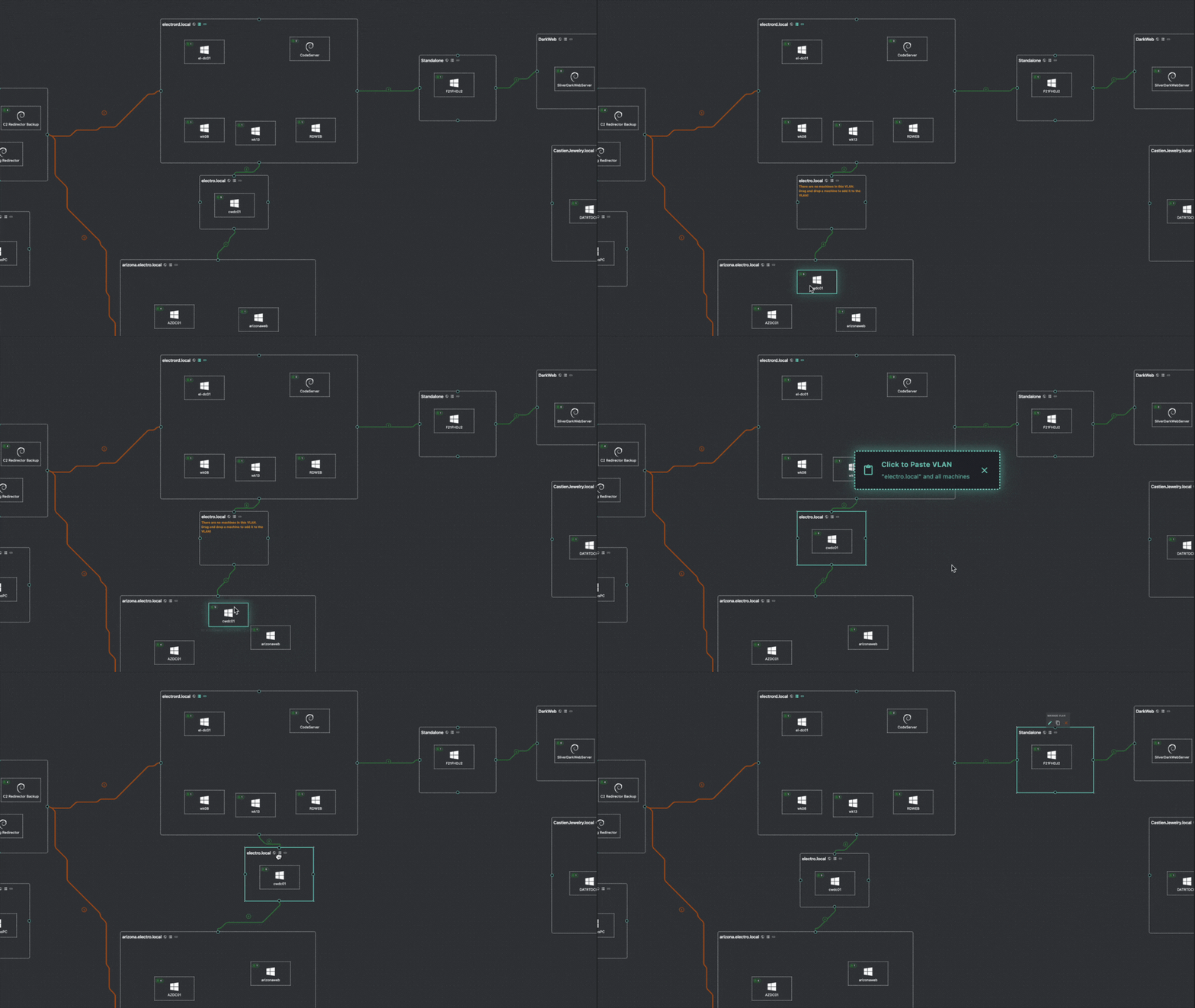
Drag and drop machines, copy VLANS, and/or move machines between VLANS
Changed your mind about a machine? Easy! Drag it over to a different VLAN!
Want a few more workstations to domain join to a DC? Easily copy/paste and duplicate machines in a few clicks.
Step 4 - Add Plugins to Machines
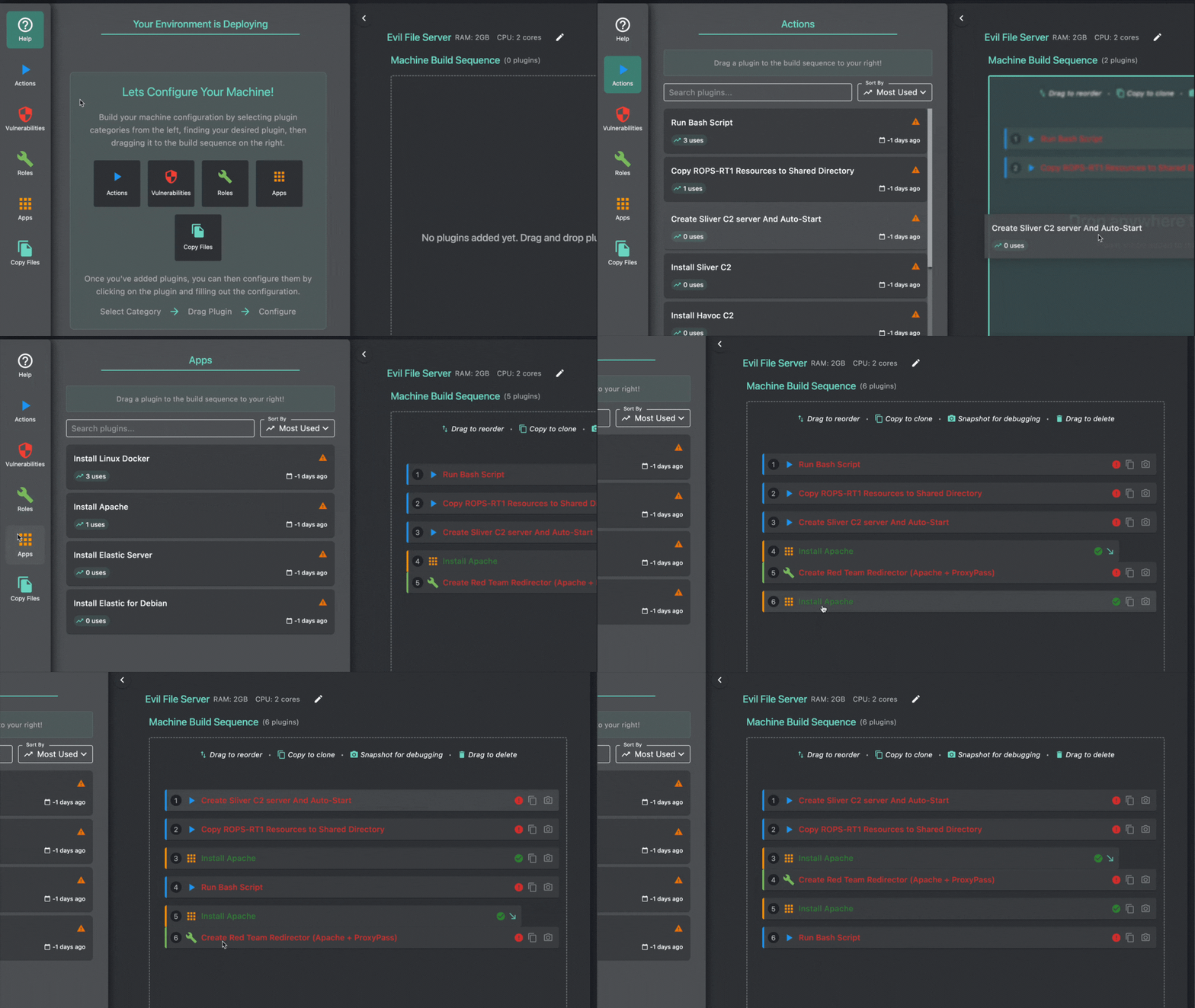
Drag and drop plugins straight to machines for easy configuration
To configure machines, users browse and add plugins from the Rogue Architect plugin library featuring over 100 plugins! These can install Chrome, Python, or even full C2 Frameworks like Sliver.
Want to promote a server to a domain controller? Drag & drop the Create Parent Domain Controller plugin.
Need workstations to auto-join the domain? Drag & drop the Join Workstation to Domain plugin.
Want users to auto-login at startup? Add the Auto Log User Into Workstation plugin.
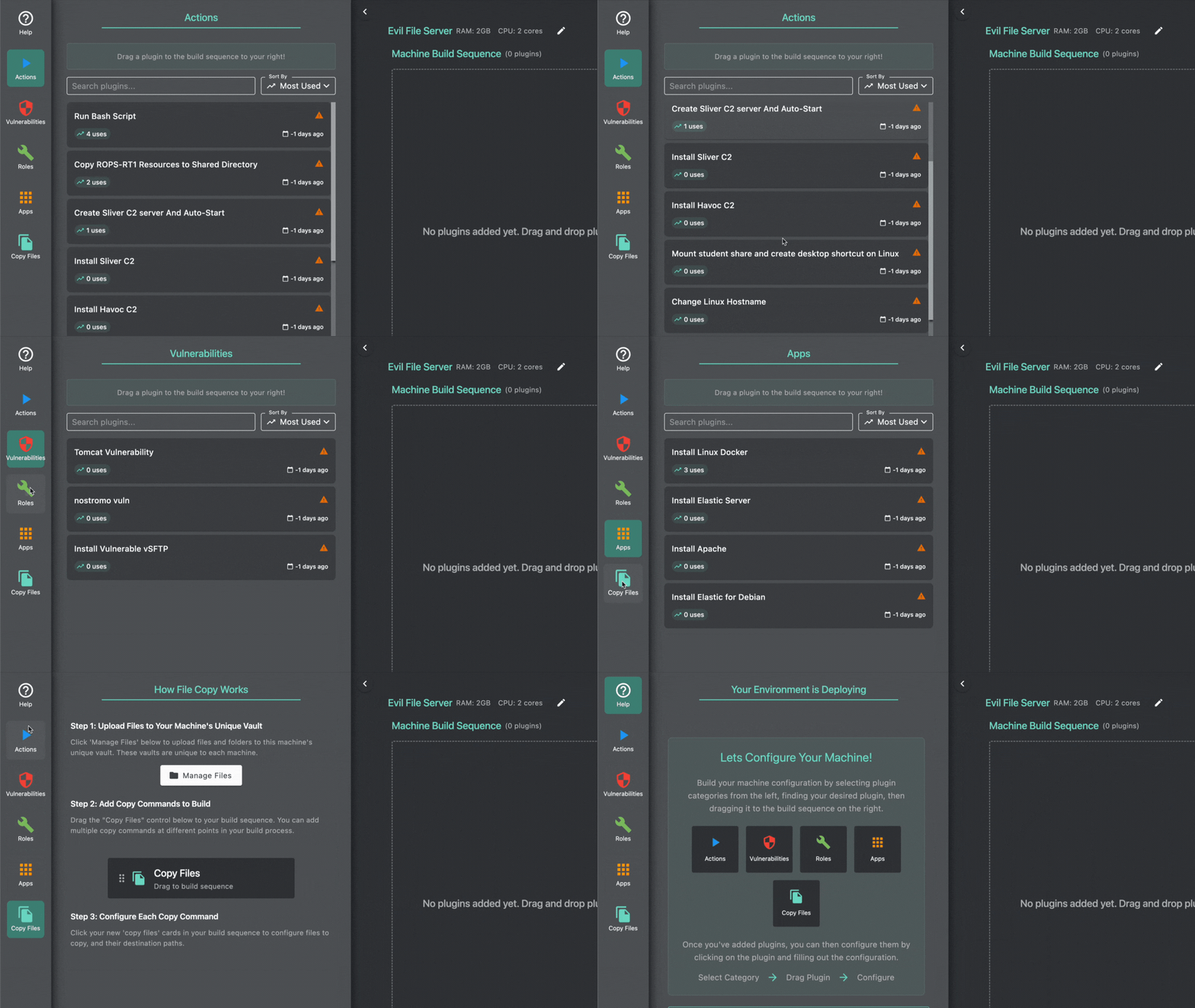
Browse the Rogue Architect plugin library
Plugins are sorted into several categories:
Machine Action: includes plugins such as Auto Log User Into Machine, Run Powershell Script, Update Wallpaper and more!
Applications: includes plugins such as Install Chrome, Install Notepad++, and more!
Roles: Roles are robust plugins that allow users to wildly customize a machine with one plugin drag and drop. You’ll find a Create Parent Domain Controller plugin, Create Child Domain Controller plugin, Create Windows Attack Machine and many more.
File Copies: are powerful plugins that allow users to effortlessly upload their OWN files into the Rogue Architect platform, and copy them to victim machines.
Vulnerabilities (Coming Soon): Ready to create a Kerberoast vulnerabilty? How about AS-REP roasting? ADCS? We've already started development of a full vulnerability library allowing users to effortlessly create vulnerable Red Team scenarios.
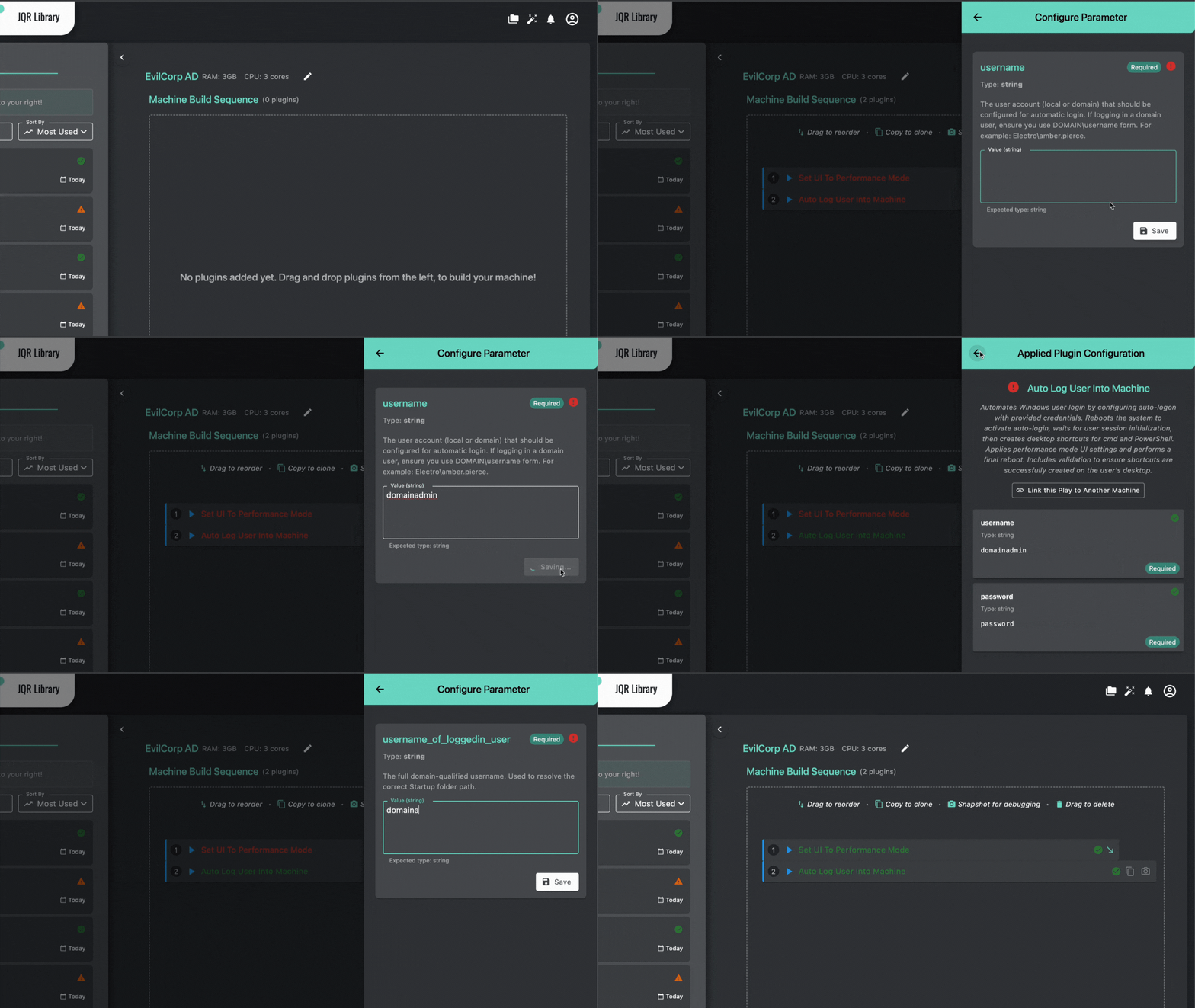
Configuring the Auto Log User Into Machine plugin with parameter manager
Once plugins are added to machines, users can effortlessly fill in any needed plugin parameters. This may include CSV’s of users to create on a Domain Controller, username/passwords to auto log users into machines, a full script editor for injecting user created Powershell scripts, etc
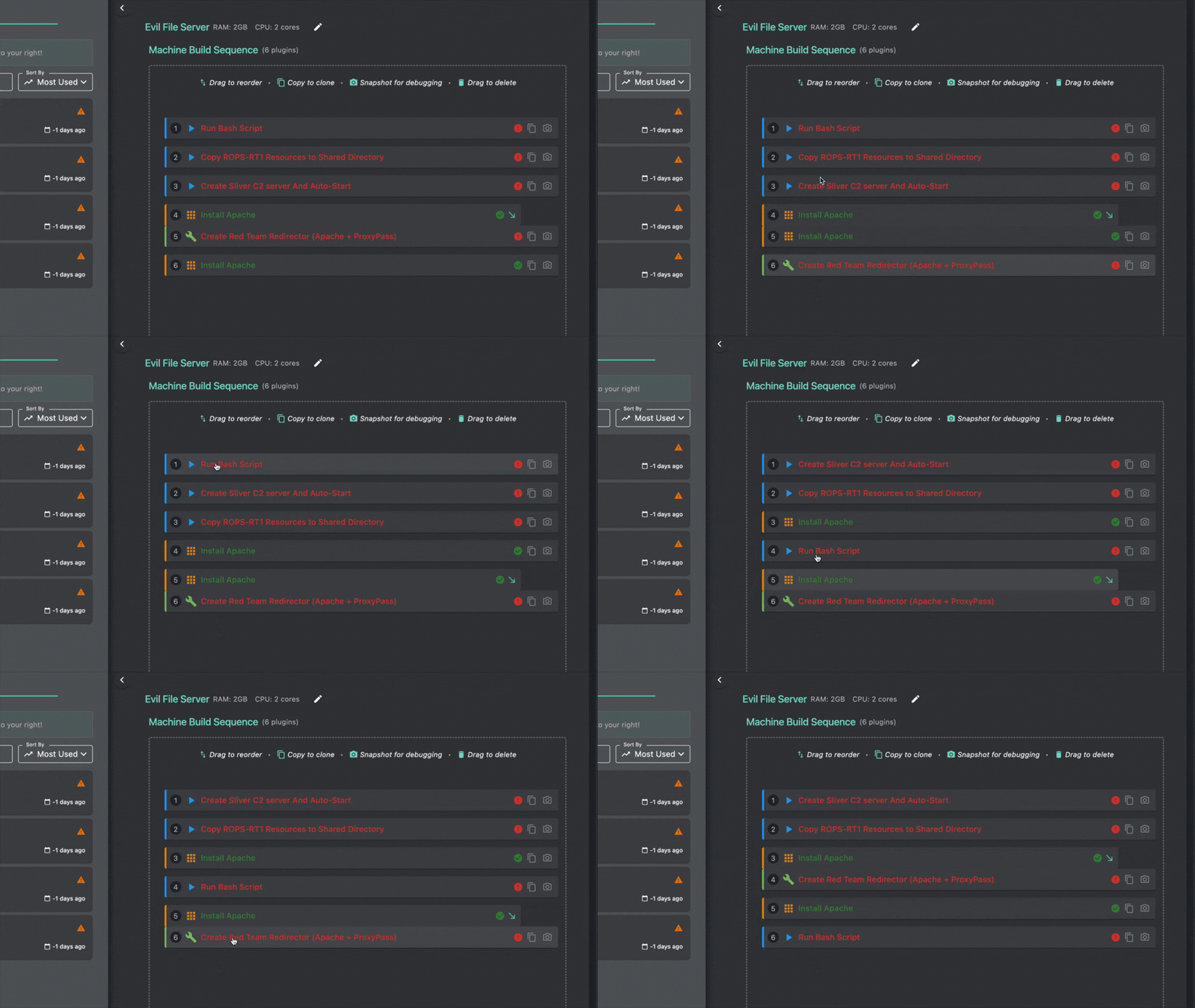
Reordering plugin execution order on a machine
Once added, plugins are easily reordered via drag-and-drop.
The future of Plugin Development
Rogue Labs is committed to continually expanding and improving the plugin library. To support this, we’ve introduced a plugin request system and a bounty board, which incentivizes users to request new plugins—or even build and share their own with the community.
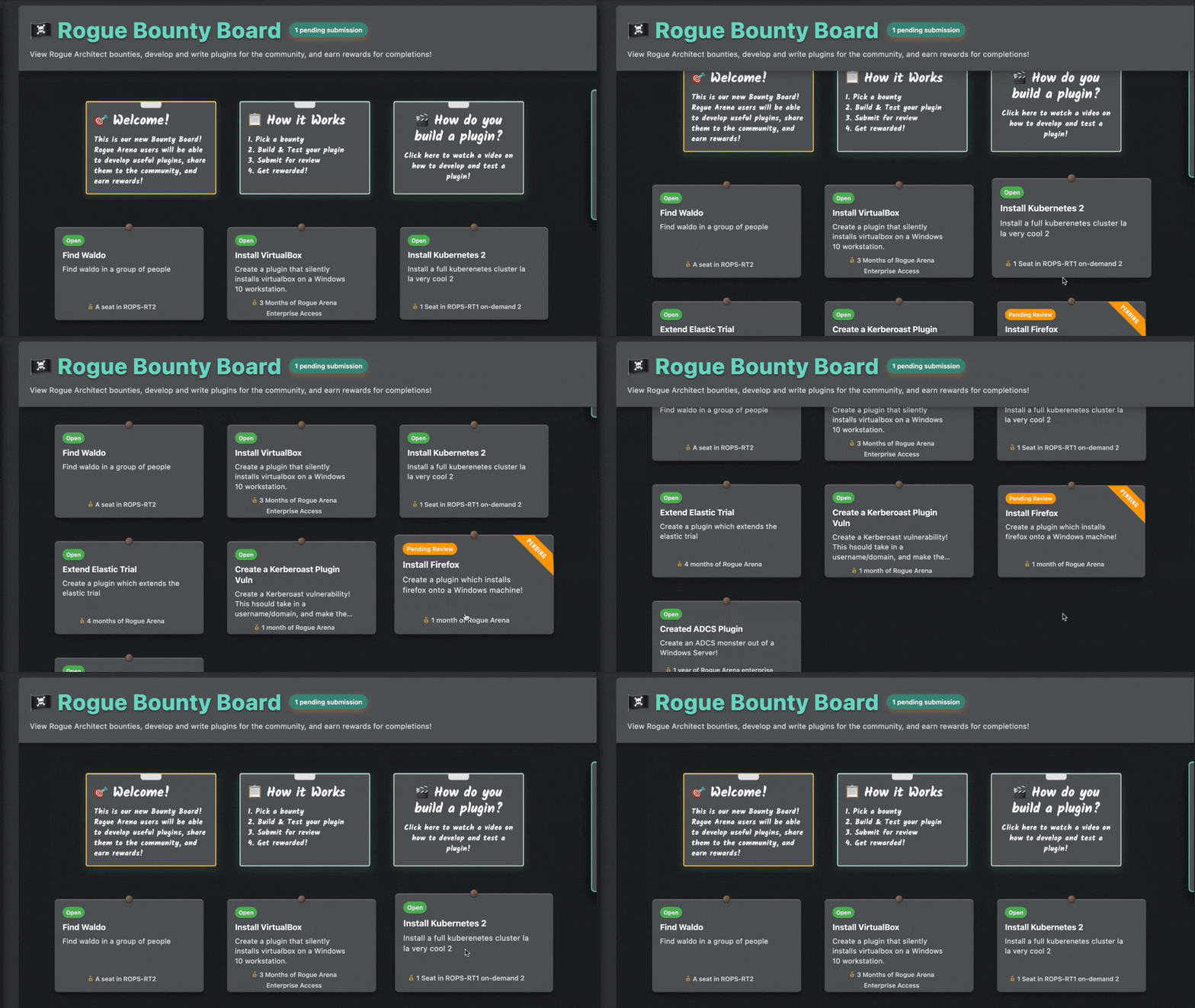
The Rogue Architect bounty board
Step 5 - Launch your build
If you’ve ever built complex 40–60 machine scenarios you know it can take HOURS for a scenario to customize and build from Ansible scripts. Even worse, after 12 hours of building it may hit an error and crash the entire active build.
Well not with Rogue Architect.
When a user deploys a Lab Blueprint, Rogue Architect automatically creates build snapshots as it progresses creating an entire Checkpoint System. This allows users to effortlessly update plugins, params, and machines, and continue from the last known clean state instead of deploying from scratch.
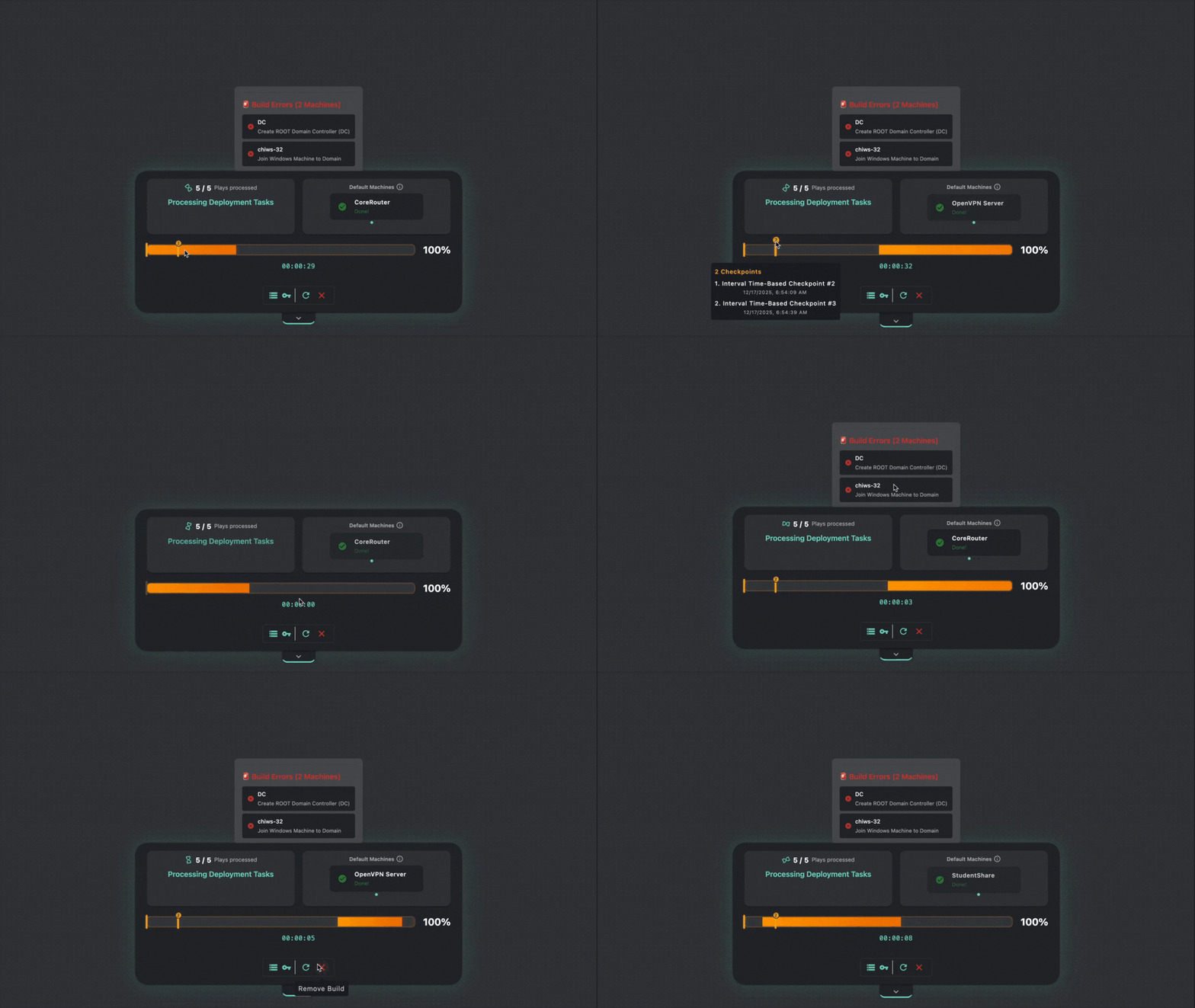
Build progress bar, with deployable checkpoints
Time to Clone
We’re in the process of porting our entire library of Red Team scenarios over to Rogue Architect, and will be opening them up to the community and Enterprise teams on our platform. This will allow users to quickly clone and create variants of existing labs, and wildly change/re-architect them to their liking!
Create additional flags and puzzles, add additional attack tools or C2 frameworks, anything is possible.

Users can easily clone and iterate on Blueprints
But, what about the curriculum & Tasks?
Building a lab is only half the battle. The next question is: how do you teach people to operate in it?
Meet the Rogue Architect Curriculum Builder.

A user browsing the ROPS-RT1 course curriculum editor
For every scenario, authors can build an entire training experience using a library of robust widgets and components.
Componants such as:
Rich text — header text, paragraph text, code blocks, and bullets
Embedded videos — upload and share video demos or walkthroughs…videos are uploaded and hosted directly from the Rogue Architect platform
PDFs — upload Powerpoint slides as PDF’s and/or PDF playbooks. Easily restrict or allow downloading of PDFs by students for offline storage
Images — upload annotated diagrams or screenshots
Add Knowledge Based Questions — students can add a number of question types to curriculum such as: long/short answer, multiple choice, or file upload (for team leads to review any code samples)
Flag-based progression — users configure locked/unlocked chapters in the curriculum optionally forcing users to progress through the scenario unlocking flags as they go
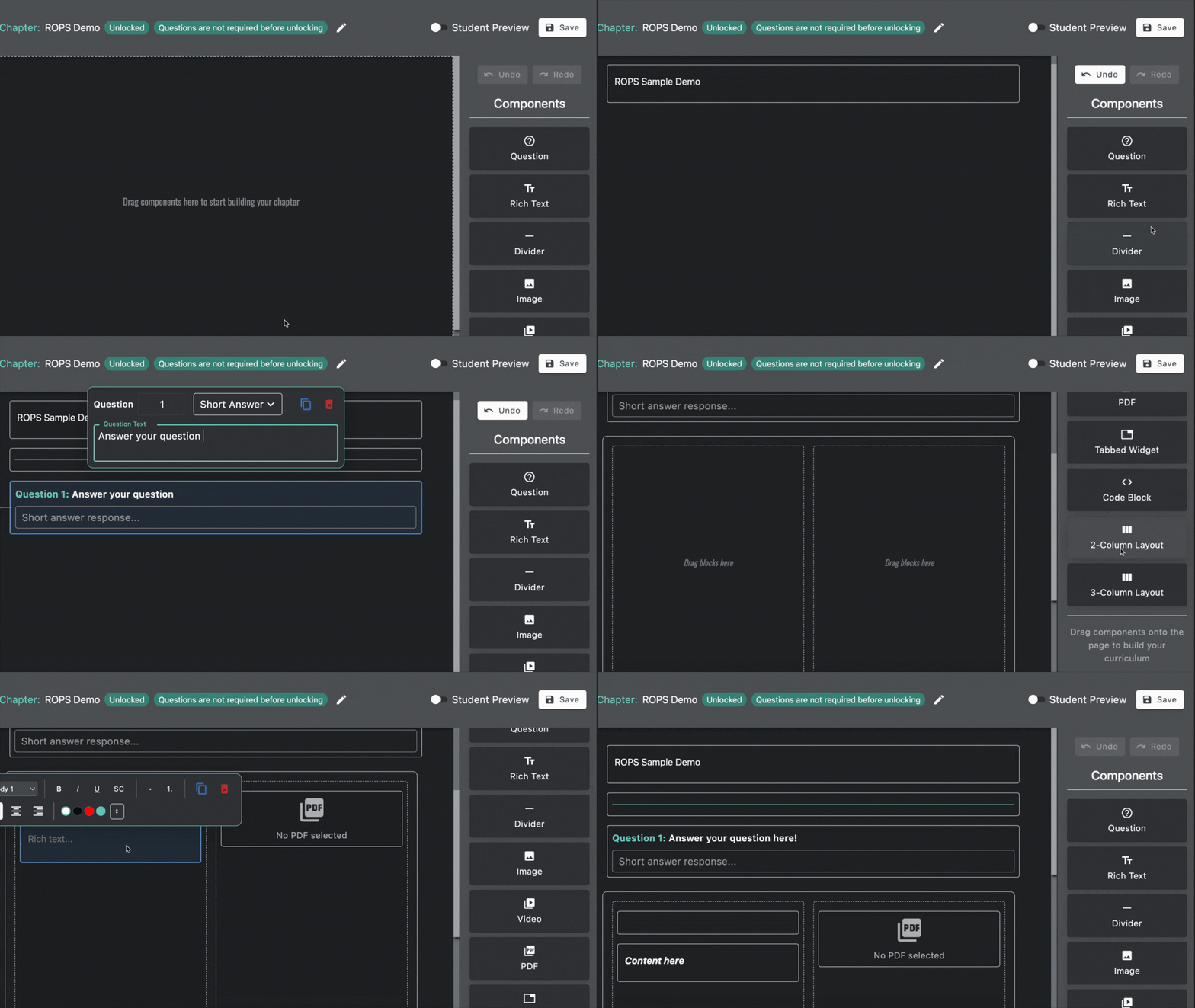
Creating a new chapter in Rogue Architect Curriculum Builder
TEAM COLLABORATION: BUILD TOGETHER
From day one, Rogue Architect was built for teams. As a result the following features are available to Enterprise Teams while using Rogue Architect:
Real-time collaboration allowing users to simultaneously build/configure the same scenario on the same Blueprint, viewing each others changes as they work in real time
Granular permissions management - users can give edit/build permissions, or regular deploy permissions to other Rogue Architect users, their team, or even a specific Distribution Group they may be a part of!
All BUILT ON THE PROVEN ROGUE ARENA PLATFORM
Rogue Architect runs on the Rogue Arena backbone — the same self-hosted, enterprise-grade infrastructure that powers our live cyber range and certification courses and receives overwhelmingly positive feedback from the community.
This means:
Always-On Performance - no hourly countdowns or minute by minute cloud hosting fees. No forced resets. Just 24/7 access to your Labs. You can deploy, teach, or test whenever inspiration strikes.
Complete Hardware & Power Redundancy - every part of Rogue Arena is backed by failover hardware — mirrored servers, redundant networking, and dual-power systems that keep your labs online even through hardware or power failures.
Seamless Multi-Lab Concurrent Operation - run Rogue Architect scenarios and course labs simultaneously with high-quality virtual machine streaming and multi-window access. Work across multiple machines at once with minimal lag or connection drops.
🤖 And shhhhhhh… THERE’S SOMETHING even BIGGER COMING
Everything above—the blueprint, plugins, checkpoints, collaboration—is just the start.
We’ve also been hard at work adding in another layer…something that will make Rogue Architect even easier to use and will result in even more realism across scenarios, allowing users to design hyper realistic 2,000+ virtual machine Labs in minutes. Labs with deep company backstories, realistic victim user roles/titles and backstories, inter-department user interactions, live file generation matching user backstory and role and more.
And to have all this, users just need to type: “Build me a large Star Wars inspired Enterprise Red Team scenario” and see what happens :)
Stay tuned for part 2 in a few weeks!